

Find your Perfect Design
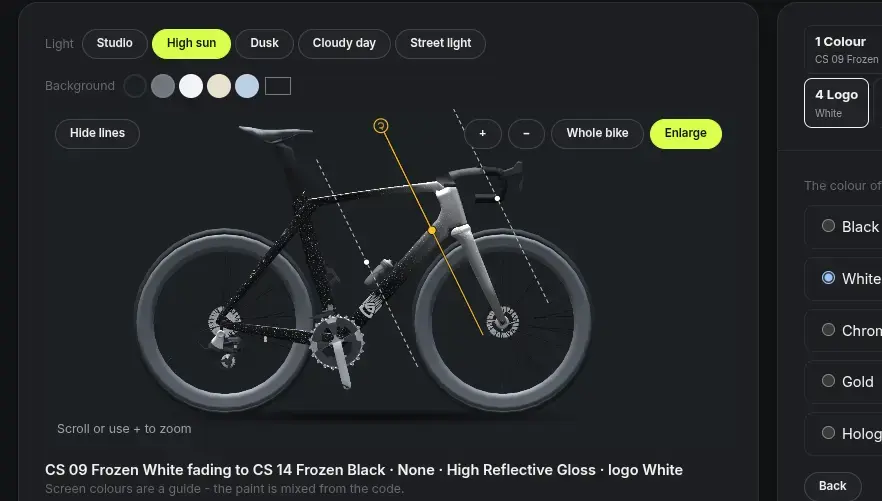
Custom Bike Paint DesignerA custom paint job is the most personal part of a bike – and the hardest to imagine from a color chip. The CSBikes Paint Designer closes that gap. You choose base colour, effect, finish and logo color step by step, and watch your design appear on a 3D model.
This is not a toy configurator. It is the same system our team uses to spec every CSBikes paint job, with the same color libraries our paint shop sprays.
What you design here is what can go on your frame.
How the Paint Designer works
Seven steps take you from a first idea to a design that is ready for our paint shop.1. Open the designer
Enter your email address and the designer opens straight away.
No account, no password.
2. Choose your base color
Start with the color that carries the whole bike. You pick from three color libraries:
- NCS - the Natural Color System used by designers and architects. It is our main library, with a huge range of precisely defined shades.
- RAL - the classic industrial color standard, if you already have a RAL number in mind.
- CSBikes Signature - our own curated color formulas.
3. Add an effect
Effect paints are sprayed over the base color. They are translucent, so your base color still shines through – the effect changes how it catches the light.
- None - a pure, solid color.
- Frozen Effect - Silver effect base - typically working best on matte finishes
- Rainbow Effect - ultra-fine prismatic pigment (10 µm) that shifts through the color spectrum as the light angle changes.
- Stardust Effect - coarser prismatic flakes (68 µm) for a sparkling, glitter-like depth in sunlight.
4. Pick the finish
The clear coat decides the character of the bike.
- Matte - calm and modern, with no reflections.
- Satin - a soft sheen between matte and gloss.
- High Gloss - a deep, wet-look shine that makes colors and effects pop.
5. Fork color and gradients
Go beyond a single color. Paint the fork in its own color, or add a gradient that flows across the frame.
Drag the line to place it, set the angle, and choose how long the blend between the two colors should be - from a sharp edge to a long fade.
6. Choose the logo color
The CSBikes shield with its speed lines sits low on the down tube, just above the chainring.
Choose Black, White, Chrome, Gold or Oilslick – a holographic decal that shimmers in every color.
7. See it in real light
A color looks different at dusk than in the midday sun.
Switch the preview between high sun, cloudy sky and dusk, change the background color, and zoom in on the details: how the effect sits on the down tube, how the gradient runs into the fork.
FROM YOUR SCREEN TO THE PAINT SHOP
Your design doesn't end as a screenshot. In our workshop, the Paint Designer is part of how every bike is built. Each design becomes a paint sheet with the exact colour codes, effect, finish and logo color, and that sheet travels with the frame to our paint shop.
No guessing, no "a bit like the picture". Our painters work from the same specification you created.
Frequently asked questions